This week, I’ve been deeply focused on agentic AI—especially combining the Q Developer CLI with AWS tools. It’s been an intense stretch, pushing toward a milestone and ironing out the complexities of making agentic workflows more seamless.
One thing that really stands out: agentic AI is incredibly powerful for troubleshooting. It can iterate over and over again until it finds the root cause. For example, with Q CLI and AWS, the agent can comb through logs, configs, and system resources in a methodical way that humans just don’t have the time for. It doesn’t get tired, it doesn’t lose patience.
But there’s a flip side. As a human with experience, I often know where to look first. My brain retains short-term memory from past runs and recognizes patterns more quickly after a few repetitions. An LLM, by contrast, starts fresh every session with no built-in memory of previous attempts unless I explicitly supply it.
So I started creating scripts that outline each troubleshooting step. That gives the AI a roadmap, avoiding the need for it to “relearn” the same process repeatedly. It makes deployment and debugging much more streamlined. But even then, Q sometimes proudly “fixes” something with a random workaround but doesn’t actually solve the root problem. And it has this habit of overwriting perfectly working code or generating way too many scripts that bloat the repo.
So I became the checkpoint. I validate everything before letting it merge. Tools like Amazon Kero help because they prompt for confirmation before overwriting, but the reality is you still have to guide it.
And demos? That was another lesson. There’s no guarantee the model will be available when you need it—throttling or high demand can easily knock you off schedule. I learned to generate a testing script ahead of time and keep a manual fallback. That way, even if the AI isn’t available, I can still run the demo without a hitch.
Prompt-Driven Development (PDD) – Kiro Style Structure
I’m now aligning my PDD workflow to a Kiro-style 4-phase structure, which keeps everything clean, reusable, and easy to maintain in version control. Instead of ad-hoc prompting, I now move through 4 deliberate phases. For each feature, I have a dedicated folder like {feature_name} and Q CLI drives everything from requirements to execution.
Here’s how it works:
- Save structured prompts like
spec-requirements-clarification.md,spec-design-document.md, spec-implementation-plan.md,spec-task-execution.md, etc., as reusable templates. - Inject those prompts into
q chatusing @‑mentions, without rewriting or pasting them every time.
Phase 1 – Clarify the Requirements
I still start with the messy idea, but instead of just dumping it in the vibe coding chat, I now let Q refine it with structured prompts. Q asks me targeted questions about the business context, performance requirements, constraints, and integrations.
For example, when I was defining a Lambda scaling improvement, I fed Q the initial scope. Then Q came back with clarifying questions about peak load, concurrency, compliance considerations, and downstream systems. It saved me from missing subtle but important constraints.
Now I run it like this:
# 1. Start by pinning the feature folder context (optional if needed)
q context add {feature_name}

# 2. Enter an interactive session
q chat

# 3. Inject the prompt
@spec-requirements-clarification
✅ Output: {feature_name}/requirements.md – with all clarified requirements locked in.
Phase 2 – Generate the Design
Next, instead of manually drafting a design, I ask Q to create a detailed design document based on the clarified requirements. This isn’t just a high-level summary—it includes proposed architecture, technical decisions, integration points, and trade-offs.
When I did this for an S3-triggered Lambda optimization, Q laid out an async processing design, proposed DynamoDB for buffering, and even suggested CloudWatch alarms for scaling visibility.
With Q CLI, it’s as simple as:
# 1. Pin the clarified requirements for context
q context add {feature_name}/requirements.md

# 2. Start chat
q chat

# 3. Inject the prompt
@spec-design-document
✅ Output: {feature_name}/design.md – fully version-controlled and ready for review.
Phase 3 – Plan the Implementation
Once the design is approved, Q generates a step-by-step task plan. This is where the magic happens—no more vague to-do lists, but an ordered execution plan with scripts, CLI commands, and dependencies clearly mapped.
# 1. Pin both requirements and design so Q knows the full context
q context add {feature_name}/requirements.md
q context add {feature_name}/design.md

# 2. Start chat again
q chat

# 3. Inject the prompt
@spec-implementation-plan
✅ Output: {feature_name}/tasks.md – a clean implementation recipe. When I used it for the Lambda feature, it included Terraform templates, async handler code, IAM policy updates, and test instructions—all sequenced in the right order.
Phase 4 – Execute Tasks Sequentially
Finally, Q executes the tasks one by one. No more giant “do everything” prompt that creates chaos. Each step is atomic and validated before moving to the next.
# 1. Pin tasks for reference
q context add {feature_name}/tasks.md

# 2. Start a chat session for execution
q chat

# 3. Inject the prompt
@spec-task-execution
Then inside the chat session, paste the guided prompt.
You have access to the file {feature_name}/tasks.md which contains the sequenced implementation plan.

Please act as a guided step-by-step execution coach:

1. Read the task list and select Task 1.
2. Describe what Task 1 is meant to accomplish.
3. Provide the exact command(s) or code snippet needed.
4. After presenting Task 1, ask me to confirm completion before proceeding.
5. If the task has sub-tasks, list and walk through those first.
6. Do not move to the next task until I say "approve" or "done".
7. At any point, if I ask for clarification or revisions, pause and accommodate.
8. Continue this process until all tasks are executed or I ask you to stop.
Q will then walk you through each task, ensure you’re in control, pause for approvals, and help you avoid execution mistakes
✅ Execution is predictable. If something fails, I know exactly which step caused it.
How the Feature Folder Looks Now
For every feature, I get a clean structure:
{feature_name}/
  ├── requirements.md   # Fully clarified requirements
  ├── design.md         # Detailed design doc
  ├── tasks.md          # Implementation plan (step-by-step)
  └── research.md       # (Optional) research summaries
This keeps everything organized, version-controlled, and reusable for future iterations or hand-offs.
Everything is organized, reusable, and version-controlled. I can hand off {feature_name} to anyone and they’ll know exactly what’s been decided and what needs to be done.
I now maintain a Kiro-style flow where Q CLI drives the entire lifecycle:
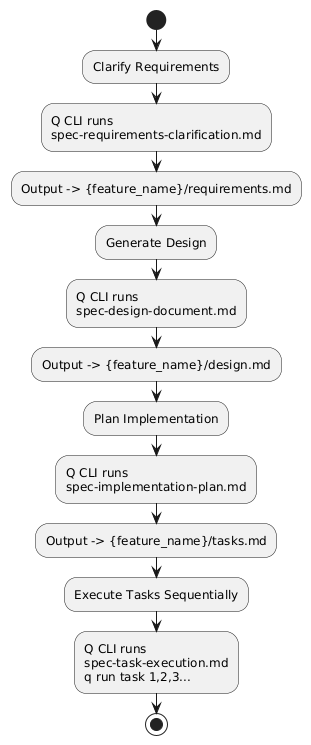
1️⃣ Clarify → {feature_name}/requirements.md
2️⃣ Design → {feature_name}/design.md
3️⃣ Plan → {feature_name}/tasks.md
4️⃣ Execute → q run task x
The AWS blog on Mastering Amazon Q Developer – Crafting Effective Prompts also gives a way to elevate these reusable prompt templates that fits perfectly into this development workflow:
[Business Context]
- Project description
- Performance & scale requirements
- Compliance needs

[Technical Details]
- Current tech stack & versions
- Constraints
- Environment details

[Specific Request]
- Task description & expected outcome
- Preferred output format
- Any special considerations
Now this template pairs naturally with the {feature_name}/requirements.md phase, making prompts consistent across projects.
Managing Prompts Like Code
I now treat prompts as reusable assets.
- I maintain a Context Prompt Library (AWS guide here) for recurring workflows.
- I follow the Amazon Bedrock Prompt Engineering Guidelines (link here) for techniques like role prompting and chain-of-thought refinement.
- And the Mastering Amazon Q Developer blog (link here) stays bookmarked for quick reference.
I even log my sessions now so I can trace what worked later:
function qchat {
  local timestamp=$(date "+%Y%m%d_%H%M%S")
  local logfile="$HOME/q_chat_logs/q_chat_$timestamp.txt"
  mkdir -p $HOME/q_chat_logs
  script -q /dev/null $(which q) chat | tee $logfile
  echo "Chat session saved to $logfile"
}
Where This All Lands
Agentic AI troubleshooting saves time, but only if you give it structure.
Prompt-Driven Development really speeds things up—but the Kiro-style flow makes it repeatable and maintainable.
And prompt engineering? That’s the hidden lever—good prompts become great prompts when you’re intentional about context and output.
Now, when I put all this together—agentic workflows, Kiro-style PDD, refined prompts—it doesn’t just feel like AI assisting me. It feels like a teammate. One that still needs my direction, but one that multiplies my speed and reach.
Next for me? I want to see what happens when multiple agents start talking to each other using the same structured context.
 My experiments with AI
Leave a comment