A builder’s goodbye
In 2022, AWS set out to solve one of the hardest problems in software delivery — unifying the fragmented developer experience that spanned CodeCommit, CodeBuild, CodePipeline, and half a dozen other services. The answer we built was Amazon CodeCatalyst: a cloud-native platform designed to bring every step of the software lifecycle—planning, coding, building, testing, and deployment—into one seamless experience.
I led the CodeCatalyst Workflows team, the engine that powered that vision. My job was to keep every pipeline running and every deployment on time, all while designing a system resilient enough to automate millions of builds across AWS accounts.
Three years later, that platform—the one we poured our energy, ambition, and late-night pager duty into—is being sunset. As CodeCatalyst moves into maintenance mode, I wanted to look back at what we built, what we almost achieved, and why I still believe it could have led the AI DevOps revolution.

CodeCatalyst Timeline
| Milestone | Date |
|---|---|
| Preview Launch @ re:Invent 2022 | December 2022 |
| General Availability (GA) | April 30 2024 |
| Idea→PR Feature Development | November 2023 |
| Maintenance Mode Announced | October 7 2025 (Closing to new customers Nov 7 2025) |
Total lifespan: ≈ 2.5 years from preview to sunset
What CodeCatalyst was (and why it mattered)
CodeCatalyst aimed to be a unified, AWS-native developer platform: plan, code, build, test, and deploy with first-class pipeline Workflows, quality Reports, and commit-to-environment Track Changes. It paired a visual editor with a YAML definition so teams could start simple and scale into code-as-config.
What Made CodeCatalyst Stand Out
🧩 Native Cloud Integration
From launch, one of the differentiators was its tight native integration with AWS infrastructure.
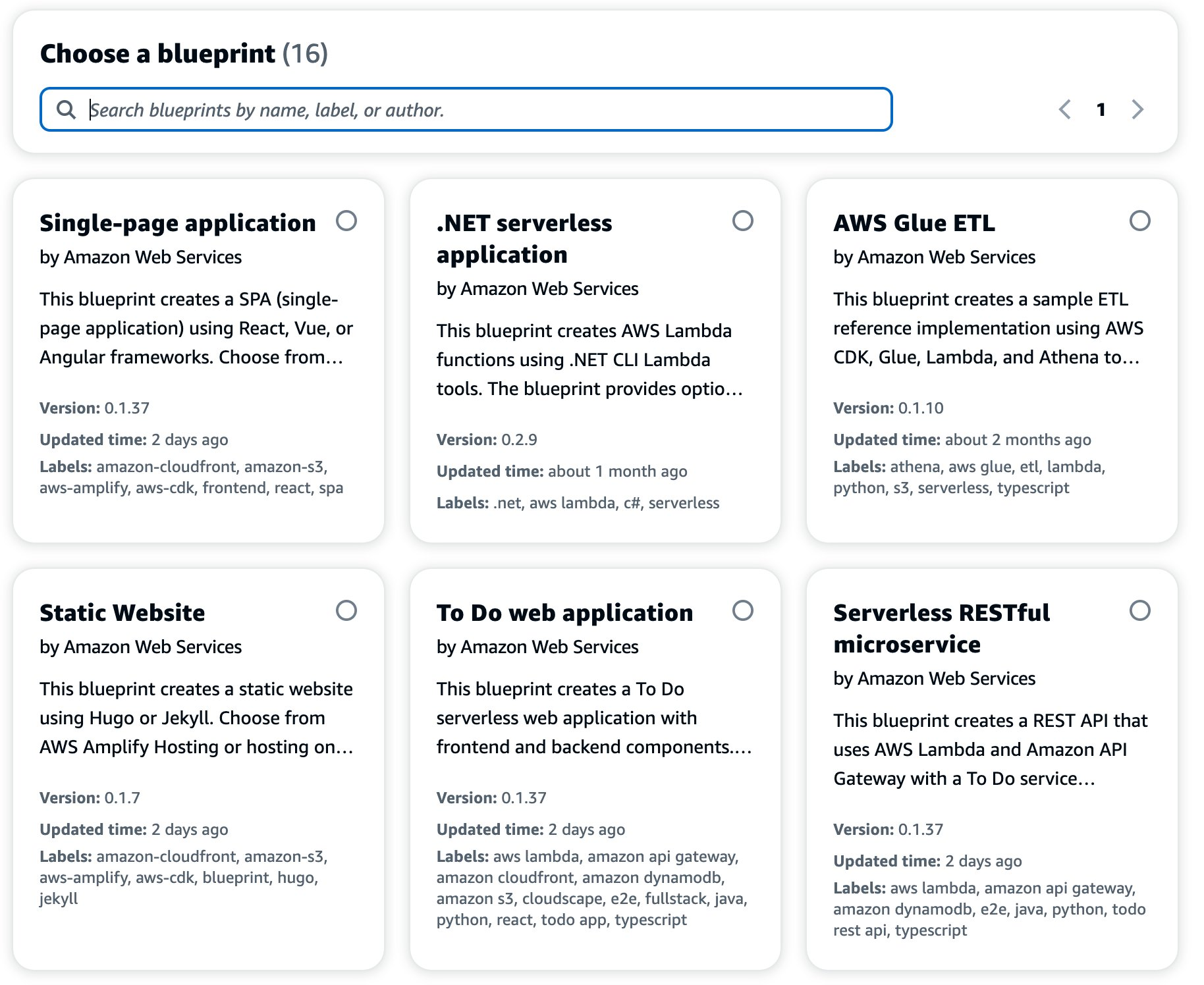
- Automatic environment provisioning: new projects spun up with preconfigured pipelines, IAM roles, and artifact storage.
- Seamless connections to CodeBuild, CodeDeploy, Lambda, and ECS without custom scripts.
- VPC-aware workflows: users could deploy to private subnets directly through managed actions.
💡 Compared to GitHub Actions or GitLab CI, which required explicit cloud credentials and cross-service glue, CodeCatalyst let AWS be the runtime and the deploy target simultaneously.
The two features I stewarded
- Workflows: declarative pipelines with actions, dependencies, gates, compute sizing, caching, and artifacts—running on managed EC2 or Lambda-based runners, with optional shared instance to avoid re-bootstrapping between stages.
- Track Changes: a deployment trace that answers the million-dollar release question—“Did this commit reach that environment?”—showing commit lists, environment status, and drill-downs.
⚙️ Workflows as First-Class Citizens
While GitHub Actions popularized YAML-based CI/CD, CodeCatalyst Workflows took it further:
- Native AWS action catalog (Build, Test, Deploy, Lambda Invoke, etc.).
- Visual editor with dependency graphs.
- Conditional and parallel execution.
- Secure secrets management tied to AWS Secrets Manager.
- Reusable workflow templates — e.g., for serverless, container, or web apps.
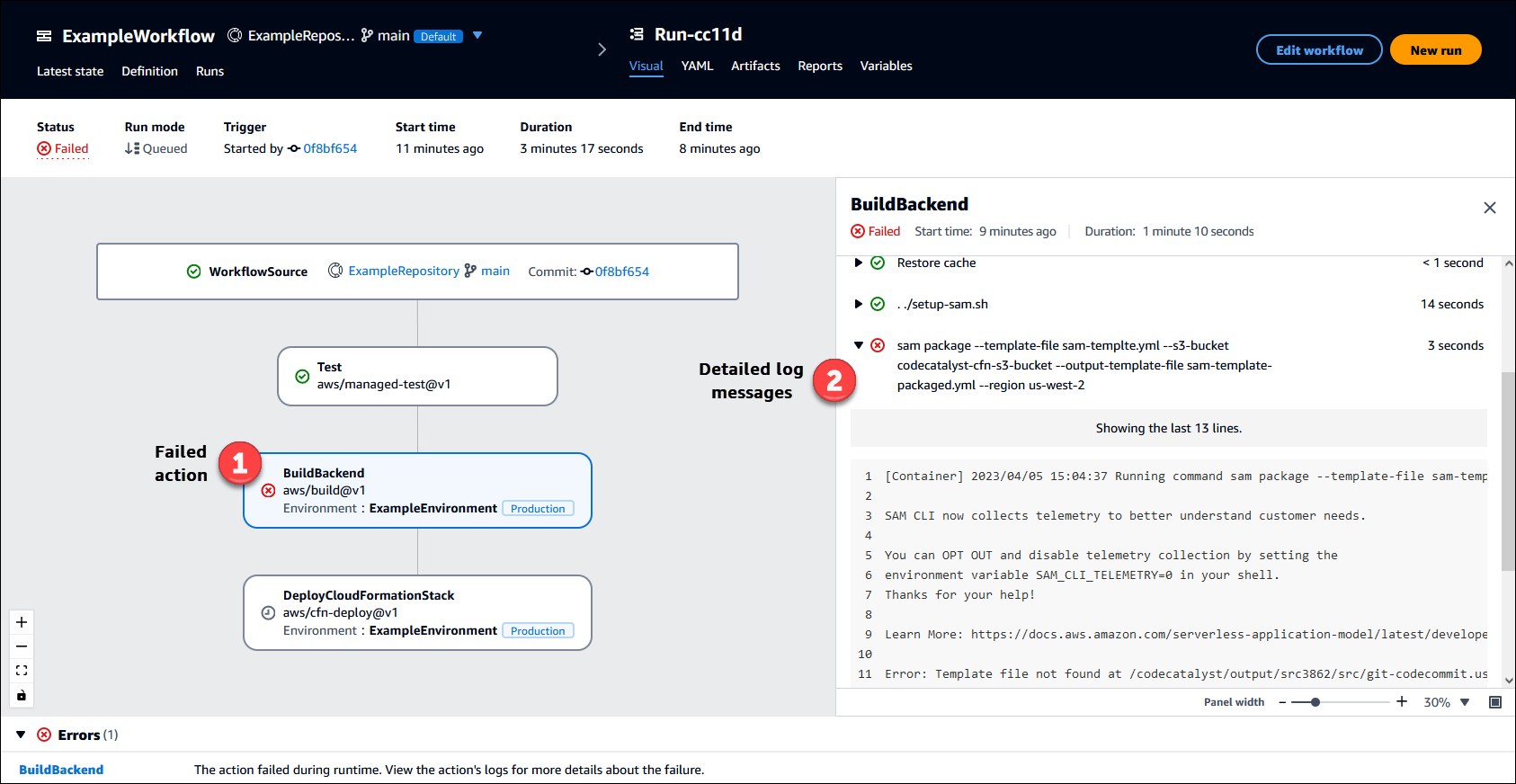
This was one of the most elegant bridges between declarative pipeline configuration and the managed CI/CD world.
🔍 Track Changes — Deployment Traceability
Unlike GitHub or Bitbucket, CodeCatalyst natively tracked commit → workflow → deployment → environment.
Users could open a Change Tracking view and see:
- Which commits were deployed where.
- Which tests ran and their outcomes.
- Who approved a deployment.
That kind of transparency is rare even today; competitors still need plugins to achieve it.
Comparing the Ecosystem
| Platform | Differentiator | Limitation |
|---|---|---|
| GitHub Actions | Massive ecosystem, reusable actions | Weak AWS-native integration, manual credentials |
| GitLab CI/CD | End-to-end DevOps inside one UI | Heavy self-hosting or SaaS dependency |
| Bitbucket Pipelines | Simple YAML pipelines | Limited for multi-account AWS |
| AWS CodeCatalyst | First truly AWS-native developer platform | Complexity of AWS IAM, and lower community adoption |
“What we had was a vision — not just another CI/CD runner, but a managed development environment where your source, pipelines, and environments existed natively on AWS.”
Openness to the ecosystem
We intentionally bridged to the GitHub universe: use marketplace Actions inside CodeCatalyst via a wrapper step (with documented limits around GitHub-context features). It worked well for linting, testing, and scanners, while keeping AWS auth seamless via account connections and roles.
The Foundation: Amazon’s CI/CD Backbone
Before diving deeper into CodeCatalyst’s features, it’s essential to understand the operational foundation that made everything possible. CodeCatalyst didn’t achieve 99.9% availability by accident—it was built on Amazon’s battle-tested CI/CD infrastructure, the same backbone that enables AWS to deploy changes 50-100 times per day across thousands of services with zero customer impact.
The Pipeline Architecture That Powers AWS
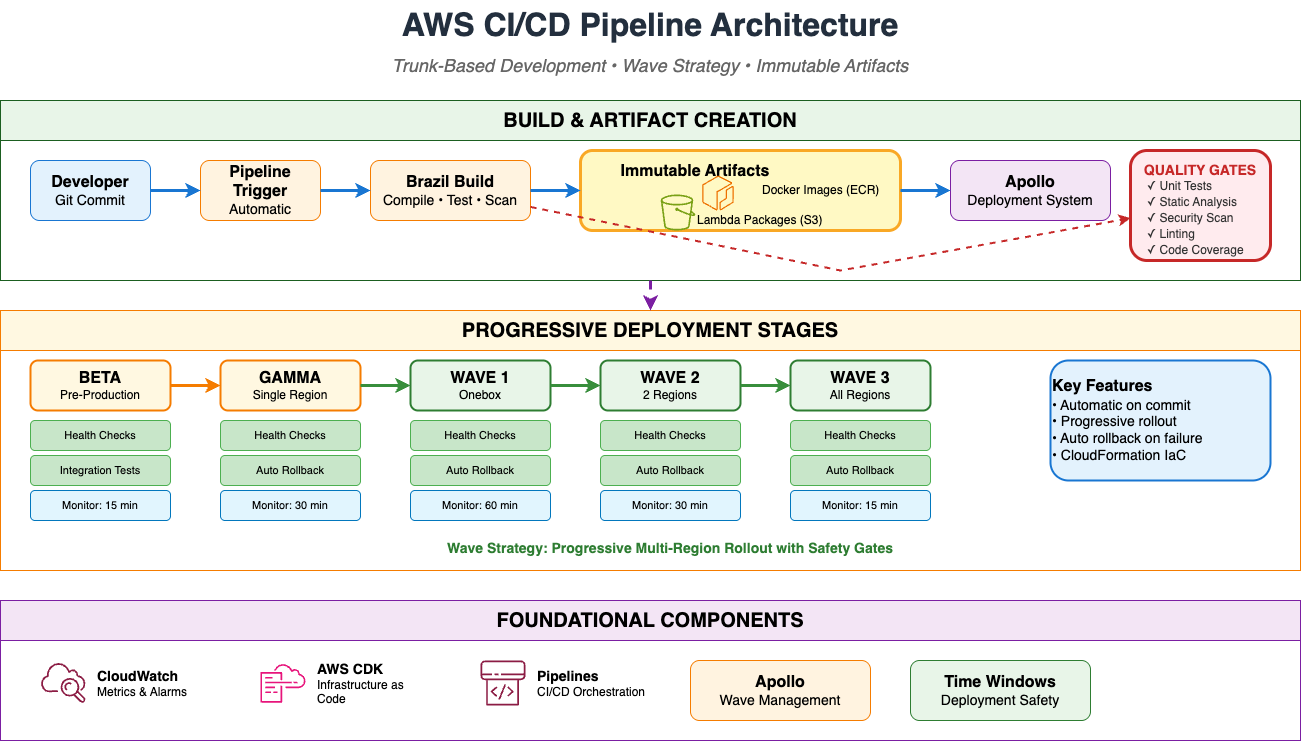
Amazon’s internal CI/CD pipeline represents one of the most mature DevOps infrastructures in the industry. Every AWS service—including CodeCatalyst—runs on this foundation:
Key Principles
1. Trunk-Based Development
At the heart of Amazon’s deployment velocity is trunk-based development—a practice that fundamentally changed how we think about code integration. Every developer commits to the main branch multiple times per day, pushing small, incremental changes rather than working on long-lived feature branches.
Each commit automatically triggers the pipeline, creating a continuous feedback loop that catches integration issues within minutes rather than weeks.
2. Immutable Artifacts
The Brazil build system creates immutable artifacts (Docker images, Lambda packages) that never change. The same artifact flows through all stages—Beta, Gamma, Production—ensuring what you test is exactly what you deploy.
3. Progressive Deployment (Wave Strategy)
Amazon deploys using a staggered, regional rollout that limits blast radius:
- Wave 1 (Onebox): Deploy to one instance in one region, monitor for 60 minutes
- Wave 2 (2 Regions): Deploy to two production regions, monitor for 30 minutes each
- Wave 3 (All Regions): Deploy to all remaining regions, monitor for 15 minutes
Blast radius control: If any wave fails, automatic rollback prevents customer impact.
4. Automated Rollback
CloudWatch alarms monitor everything in real-time:
- Error rates (threshold: <1%)
- Latency p99 (threshold: <500ms)
- CPU usage (threshold: <80%)
- Memory usage (threshold: <85%)
If any threshold is breached → automatic rollback to the last known good version within seconds.
Security & Compliance Gates
Every deployment passes through multiple quality gates:
Static Analysis (AppSec)
- SAST (Static Application Security Testing) scans source code for vulnerabilities, DAST (Dynamic Application Security Testing) probes running applications for weaknesses, and SCA (Software Composition Analysis) audits dependencies for known security issues.
- Block releases containing high-severity issues
- No exceptions—security is enforced by the platform
Policy Checks
- GDPR compliance (data sovereignty)
- AWS best practices (Well-Architected Framework)
- Internal security policies
- All validated automatically before deployment
Operational Readiness Review (ORR)
Before any new service reaches production at Amazon, it must pass the Operational Readiness Review (ORR)—a comprehensive checklist that validates operational maturity, not just functional correctness. The ORR asks hard questions:
- Deployment frequency metrics – How frequently can you deploy?
- Disaster recovery tests – Have you run disaster recovery drills?
- Game day scenarios (chaos engineering)
- Monitoring setup (alarms, dashboards)
- Runbook documentation
Multi-Account Isolation
Dev, staging, and production run in separate AWS accounts with independent IAM policies. You cannot accidentally delete production resources while testing—architectural isolation prevents catastrophe.
Why This Foundation Matters
This operational discipline is what enabled CodeCatalyst’s core differentiators:
Zero Credential Management
CodeCatalyst eliminated AWS credential sprawl through automatic IAM role assumption. Connect your AWS account once, and CodeCatalyst handles authentication for all deployments—no static keys, no OIDC configuration, no credential rotation nightmares.
Deployment Traceability Built-In
Track Changes wasn’t a plugin or add-on—it was core to the platform because Amazon’s CI/CD DNA includes full lineage tracking. Every artifact knows its source commit, which tests passed, who approved it, and when it deployed.
Production-Grade Reliability
The same pipeline architecture that deploys AWS services deployed CodeCatalyst itself. We achieved 99.9% availability because we inherited Amazon’s operational excellence: progressive rollout, automatic rollback, comprehensive monitoring.
This is the operational DNA we brought to CodeCatalyst—and it’s what separates prototype platforms from production platforms.
Comparison Matrix — CodeCatalyst Workflows vs GitHub Actions
| Area | CodeCatalyst Workflows | GitHub Actions |
|---|---|---|
| Workflow file | .codecatalyst/workflows/*.yaml. Actions + deps, compute, gates, artifacts, caching, reports. Visual editor ↔ YAML. | .github/workflows/*.yml. Jobs + steps, needs, expressions. YAML only (assistive UI). |
| Triggers | PUSH, PULLREQUEST, SCHEDULE (EventBridge-style cron, ≥30-min). Branch/file filters. Manual = omit triggers. AWS Documentation | Dozens of events (push, pull_request, schedule, workflow_dispatch, repository_dispatch, issues, releases, etc.). Rich filters. |
| Runners / Compute | Managed EC2 (sizeable), Lambda (fast spin-up), Provisioned Fleets (warm, VPC), SharedInstance across actions. | Hosted Linux/Windows/macOS; self-hosted anywhere; containerized jobs; service containers; matrix builds. |
| AWS auth | Native account connections & IAM role assumption per action/environment; no static keys. AWS Documentation | OIDC (via configure-aws-credentials) or secrets; more DIY but flexible. Reference |
| Artifacts | Declarative Outputs.Artifacts + consumption; Reports tab parses JUnit/coverage; quality gates. AWS Documentation | Upload/Download via actions; no native report dashboards (use checks/third-party). GitHub Docs |
| Caching | Built-in file caching (keys, restore keys, branch scoping). AWS Documentation | actions/cache step; flexible but manual. GitHub Docs |
| Approvals / Gates | Explicit Approval action (1–2 approvers) inline in pipeline. AWS Documentation | Environments with protection rules/approvers; per-job, not a pipeline step. GitHub Docs |
| Ecosystem | Built-in AWS actions; can run GitHub Marketplace actions via wrapper (w/ limits on GH-context). AWS Documentation | Massive Marketplace (10k+); first-class GH context; composite/container/JS actions. GitHub Docs |
| Traceability | Track Changes: commit→env status view. AWS Documentation | Tight PR integration (Checks tab), annotations; no native commit→env dashboard. GitHub Docs |
| DX niceties | Visual workflow graph; YAML↔UI parity; AWS tools preinstalled. AWS Documentation | Expressions, matrix, services, reusable workflows; richer conditions. GitHub Docs |
| Status/Lifecycle | Availability change—no new customers after Nov 7, 2025. Amazon Web Services, Inc. | Actively developed, broad adoption. GitHub Docs |
TL;DR
Where GitHub Actions prevails: breadth of triggers; Marketplace depth; multi-OS runners + matrix + service containers; deep PR/Checks integration; long-term runway.
Where CodeCatalyst excelled: AWS-native auth + multi-account deployments; built-in artifacts/reports; explicit approval gates; optional Lambda runners; Track Changes visibility.
Advanced CI/CD Capabilities We Built
CodeCatalyst Workflows went beyond basic CI/CD to solve real enterprise deployment challenges. Here are the capabilities that set it apart:
1. Multi-Cloud Container Deployment
The Challenge: Enterprises run hybrid environments—training ML models on AWS, serving them on Azure or GCP. Traditional CI/CD tools assume single-cloud, making multi-cloud a nightmare of credential management.
CodeCatalyst’s Solution: A single workflow could build on AWS, push to multiple container registries, and deploy across clouds.
# Example: Train on SageMaker, Deploy to Azure Kubernetes Service
Actions:
  BuildAndTrain:
    Identifier: aws/build@v1
    Configuration:
      Steps:
        - Run: python train_model.py
        - Run: docker build -t model:v1.2.3 .

  PushToECR:
    DependsOn: [BuildAndTrain]
    Identifier: aws/ecr-push@v1
    Configuration:
      Registry: 123456789012.dkr.ecr.us-east-1.amazonaws.com
      Image: ml-model

  DeployToAzure:
    DependsOn: [PushToECR]
    Identifier: aws/azure-deploy@v1
    Configuration:
      Provider: Azure
      Resource: AKS
      Cluster: production-cluster
What we enabled: Zero credential management for cross-cloud deployment. CodeCatalyst handled Azure authentication automatically.
2. Multi-Region ECS Deployment
The Challenge: Global applications need high availability and low latency across regions. Traditional CI/CD deploys one region at a time—slow and error-prone.
CodeCatalyst’s Solution: Deploy to 4 regions in 8 minutes with coordinated rollback.
Actions:
  DeployPrimary:
    Identifier: aws/ecs-deploy@v1
    Environment:
      Connections:
        - Name: prod-us-east-1
    Configuration:
      Region: us-east-1

  DeployWest:
    DependsOn: [DeployPrimary]
    Configuration:
      Region: us-west-2

  DeployEurope:
    DependsOn: [DeployPrimary]
    Configuration:
      Region: eu-west-1

# All regions deploy in parallel after primary succeeds
# Automatic rollback if any region fails
Time savings: 8 minutes vs. 2 hours manual deployment
3. Deployment Approval Gates with Full Context
The Challenge: Production deployments require manual sign-off for compliance, but most tools make this clunky.
CodeCatalyst’s Solution: Built-in approval gates with full deployment context.
ApproveProduction:
  DependsOn: [DeployStaging]
  Identifier: aws/approval@v1
  Configuration:
    Approvers:
      - team:platform-engineering
    RequiredApprovals: 2
    TimeoutInMinutes: 60

    Notifications:
      - Type: slack
        Channel: "#deployments"

    DeploymentDetails:
      StagingTestResults: 1247/1247 tests passed
      SecurityScan: passed
      Strategy: canary
What reviewers see:
- Exact commit being deployed
- All test results from staging
- Security scan results
- Deployment strategy details
- Who else has approved
Compliance-ready: Full audit trail in CloudTrail
4. GitFlow Integration (Multiple Long-Lived Branches)
The Challenge: Teams want GitFlow (main, develop, feature branches) but CI/CD tools struggle with multiple long-running branches.
CodeCatalyst’s Solution: Each branch maps to its own environment with separate workflows.
Branch Structure:
main          → Production (AWS Account: 999888777)
├─ develop    → Integration (AWS Account: 888777666)
   ├─ feature/auth    → Dev environment (personal sandbox)
   └─ feature/payment → Dev environment (personal sandbox)
Result: No environment collision, parallel development tracks, clear environment ownership
5. Rapid Single-Page Application Deployment
The Challenge: SPAs need fast iteration cycles, but S3+CloudFront deployment is manual (10-20 minutes).
CodeCatalyst’s Solution: Automated S3 upload + CloudFront invalidation in under 10 minutes.
Actions:
  BuildSPA:
    Identifier: aws/build@v1
    Configuration:
      Steps:
        - Run: npm run build
      Outputs:
        Artifacts:
          - Name: BuildArtifacts
            Files: ["dist/**"]

  DeployToS3:
    DependsOn: [BuildSPA]
    Identifier: aws/s3-deploy@v1
    Configuration:
      Bucket: myapp-spa-prod

  InvalidateCloudFront:
    DependsOn: [DeployToS3]
    Identifier: aws/cloudfront-invalidate@v1
    Configuration:
      Paths: ["/*"]
Developer experience: Commit → automatic build → live in production in <10 minutes
6. Multi-Environment Progressive Deployment
The Challenge: Enterprise apps need dev, staging, and production in different AWS accounts—manual setup for each is slow and error-prone.
CodeCatalyst’s Solution: Single workflow deploys to all environments sequentially with approval gates.
Actions:
  DeployDev:
    Environment:
      Name: development
    Configuration:
      DesiredCount: 2  # Lower for dev

  DeployStaging:
    DependsOn: [DeployDev]
    Environment:
      Name: staging
    Configuration:
      DesiredCount: 4

  ApproveProd:
    DependsOn: [DeployStaging]
    Identifier: aws/approval@v1

  DeployProd:
    DependsOn: [ApproveProd]
    Environment:
      Name: production
    Configuration:
      DesiredCount: 10
      Strategy: canary
Setup time: 30 minutes (vs. 3 days manual)
The Idea→PR milestone (Nov 2023)
In late 2023, our team prototyped Idea→PR: take a natural-language idea/issue and produce a tested, merge-ready PR asynchronously—agentic, reviewable, and human-in-the-loop. We built it inside CodeCatalyst using Claude (the same design spirit that later shows up in Amazon Q), with Git-flow awareness and async teammate metaphor—not just an inline code typer. That work is proudly on the record via leadership posts and a public demo.
That early “agent as a teammate” pattern prefigured what we now see across GitHub Copilot, Claude Code, OpenAI-powered agents, Sourcegraph, Cline, Cognition’s Devin, etc.
The timing is worth noting: our Idea→PR prototype in November 2023 came five months before GitHub announced Copilot Workspace, and while CodeCatalyst was still in preview. We had a working agentic coding system integrated into a full CI/CD platform before most of the industry understood what that meant.
From CodeCatalyst to Amazon Q — what might have been
If CodeCatalyst had stayed the nucleus of AWS’s developer experience, the integration of Amazon Q and Kiro could have fundamentally redefined what CI/CD means.
CodeCatalyst went from General Availability to maintenance mode in ~17 months. That’s barely enough time for enterprise adoption cycles to complete, let alone for the platform to mature into the AI-native vision it could have been. The platform was killed before most potential customers could complete a full adoption cycle.
When I look at the direction AWS has taken with GitLab Duo + Amazon Q, I see a mirror of what I long hoped CodeCatalyst itself could become. In April 2025, AWS announced that GitLab’s DevSecOps platform would embed Amazon Q agents directly into the issue → PR → pipeline loop.
Developers can summon Q with a /q dev command in an issue comment, and the system will propose a merge request across multiple files (frontend, API, styling). Q agents can also review MRs (/q review), generate tests (/q test), and do code transformations like Java version upgrades.
I can’t help imagining: what if CodeCatalyst had been the native host for those AI agent capabilities? Instead of outsourcing the pipeline + AI combo to GitLab, AWS might have controlled the entire stack—CI, repo, agent logic, audit, logs—in one unified platform.
Unlike GitLab Duo’s plugin-style integration, CodeCatalyst had the structural advantage: it already controlled the full delivery surface — source repos, workflows, deployments, environments, and IAM.
That vertical integration was our golden ticket. With Q as the reasoning layer, we could have created an AI-augmented DevOps continuum, where automation wasn’t just scripted — it was self-aware.
1️⃣ AI-Native Workflow Generation
Every CodeCatalyst workflow began as a YAML file or visual graph. Amazon Q could have transformed that authoring step into a conversation.
“I’m deploying a multi-region ECS service with a staging approval gate.”
Q replies with a pipeline: build → test → image scan → deploy → approve → promote.
It could infer branch protections, choose instance types, configure cache policies, and even optimize runner allocation.
Instead of static Blueprints, we could have delivered adaptive blueprints — pipelines generated and evolved by Q based on your team’s behavior, historical failures, and runtime patterns. Amazon Q could then continuously re-train these pipelines using internal telemetry.
2️⃣ Autonomous Pull Requests and Code Review Agents
Our Idea→PR prototype from late 2023 already hinted at this future: a teammate AI that listens to issues, proposes PRs, and learns from review comments.
Embedding Amazon Q inside CodeCatalyst would have turned this into a seamless code–review–deploy loop, where each PR becomes a conversation among humans and agents.
/q devcould generate code changes from work items./q reviewcould summarize diffs, point out security smells, and propose mitigations./q testcould inject missing test cases based on coverage reports.
These agentic steps would be visible inside Track Changes, linking ideas → code → deployment → results — a lineage graph no other CI/CD system currently exposes.
3️⃣ Secure Supply Chain + Provenance Intelligence
The “Secure Supply Chain” initiative we incubated was the perfect stage for AI infusion.
With Amazon Q, CodeCatalyst could have evolved into a self-auditing build platform:
- Each artifact signed and traceable to its source commit, dependency graph, and build environment.
- Q agents continuously verifying provenance, flagging drifts, and suggesting rebuilds when transitive dependencies changed.
- Integrated DORA metrics (lead time, deployment frequency, MTTR, failure rate) feeding into Q’s reasoning engine to propose process optimizations.
This would shift CI/CD from automation to assurance — the pipeline not only builds software, but proves its integrity.
4️⃣ AI-Driven Dev Environments
CodeCatalyst Dev Environments already offered on-demand workspaces defined by devfile.yaml.
Amazon Q could have transformed them into context-adaptive IDEs:
- Detect when your local environment diverges from the pipeline and auto-sync dependencies.
- Spin up ephemeral environments that include private VPC resources for integration testing.
- Recommend container images or tooling updates before drift causes build breaks.
Combined with Q’s telemetry, each developer’s environment could continuously evolve toward the team’s ideal baseline — a living model of the project’s ecosystem.
5️⃣ Predictive Pipeline Optimization
By analyzing thousands of historical runs, Amazon Q could learn how your workflows behave under different loads:
- Predict which stages will bottleneck.
- Reorder or parallelize tasks automatically.
- Suggest resource right-sizing to cut build costs.
- Identify flaky tests or unnecessary waits between gates.
We could feed these insights into an internal recommendation engine —
“your average workflow duration could drop 18 % if you parallelize these two stages.”
CI/CD becomes self-tuning.
6️⃣ Integrated Governance and Guardrails
CodeCatalyst’s strength was its IAM-native DNA.
With Q integrated at the orchestration layer, compliance could become proactive rather than reactive:
- Detect violations of internal policy (unapproved images, missing vulnerability scans).
- Auto-generate remediation commits or enforce gate policies before promotion.
- Reason over multi-account deployments and ensure cross-role trust boundaries are maintained.
Where GitHub Actions and GitLab depend on scripts or OPA policies, CodeCatalyst could have had an AI-aware governance plane, always learning from prior audits.
7️⃣ The Vision: From CI/CD to Continuous Intelligence
Imagine combining all these layers:
- Dev environments aware of internal systems.
- Q agents generating, testing, and securing code.
- Provenance and DORA analytics feeding back into the workflow engine.
- Pipelines that rewrite themselves to stay optimal.
This is continuous intelligence, not just continuous delivery.
If AWS had continued evolving CodeCatalyst with Amazon Q at its core, it wouldn’t just compete with GitHub Copilot or GitLab Duo — it could have defined the next generation of intelligent DevOps.
The irony is that all the foundational pieces — Workflows, Track Changes, Secure Supply Chain, IAM integration, and the embryonic Idea→PR agent — were already there.
Today, GitHub Copilot Workspace, GitLab Duo, Sourcegraph Cody, and Amazon Q are all converging on the same insight: CI/CD must become intelligent. Agents need to live inside the full development lifecycle, not just in your editor.
If there’s a lesson here for builders and leaders alike, it’s this: the next DevOps revolution won’t come from faster builds or prettier dashboards. It’ll come from platforms that learn and reason with their users — where delivery pipelines become collaborators, not just automations.
 My experiments with AI
Leave a comment